
How do I reduce my digital footprint?
Reducing your digital footprint works best in a fixed order: close accounts you no longer use, delete or unpublish old posts, tighten the privacy settings on the accounts you keep, opt out of the people-search sites and the data brokers behind them, and last, reduce what your browser and devices give away in future. Doing it in that order matters because each step shrinks the work in the next one. The whole sequence is free. What it will not do is produce a blank slate, and the final section says plainly which parts stay regardless.
Step one: close the accounts you no longer use
Dormant accounts are the highest-value target because they are pure liability. They hold data, they are often public, they carry old photographs and old opinions, and nobody is watching them for a breach notice.
Find them by searching your email archive for "welcome to", "verify your email", and "confirm your account". Work back as far as your archive goes. For each account: export your data if you want it, delete the content you posted, then delete the account rather than deactivating it. On several large platforms, closing an account leaves the posts behind in an orphaned form, so removing content first is what makes the deletion complete.
Set aside the accounts you actually use. They come later and they need a different treatment.
Step two: deal with the posts you published
This is the tedious step and the one with the most visible effect, because published posts are what a name search returns.
Work platform by platform rather than jumping around. Most large services have a bulk activity view that lets you filter your own posts by year and delete in batches. Photographs deserve a second pass: check what is visible in the background, what the caption reveals, and whether location data is attached.
Two honest notes. Deleting a post removes the original and not the copies, so anything screenshotted, quoted, or archived survives. And there is no need to be systematic about a decade of neutral material; the items worth spending time on are the ones a stranger would form an impression from.
Step three: tighten what the accounts you keep are broadcasting
For each account you are keeping, walk the privacy settings once, properly.
- Set the default audience for future posts, and separately change the audience on past posts, which is usually a different control.
- Turn off search-engine indexing of your profile where the platform offers it.
- Review which third-party apps have access, and revoke the ones you no longer recognise.
- Turn off location tagging, and strip location data from photographs before uploading.
- Hide follower and following lists, birthdays, and contact details.
- Check what appears when your profile is viewed by someone logged out, which is the only view that matters here.
The NIST Privacy Framework frames this stage the same way, as governing what gets collected in the first place rather than cleaning up afterwards, and prevention is genuinely the cheaper half of this work.
Step four: opt out of people-search sites and data brokers
Now the passive half. People-search sites publish your name, approximate age, addresses, and relatives, and they rank well for full-name queries. Each has an opt-out, each opt-out is different, and most take between a few days and a few weeks.
Behind them sit the brokers that supply the records. Removing a listing without opting out of the supplier is why listings come back. The Privacy Rights Clearinghouse data broker directory is the most usable public index of who they are and where their opt-out pages sit, and several states now publish registries of brokers operating there.
Practical advice for surviving this step: use a dedicated email address for the opt-out forms, keep a spreadsheet of what you submitted and when, and cap each session rather than trying to finish in one sitting. Paid removal services do the same work on a subscription and face the same limits you do, which is the honest description of what you are buying: time, not access.
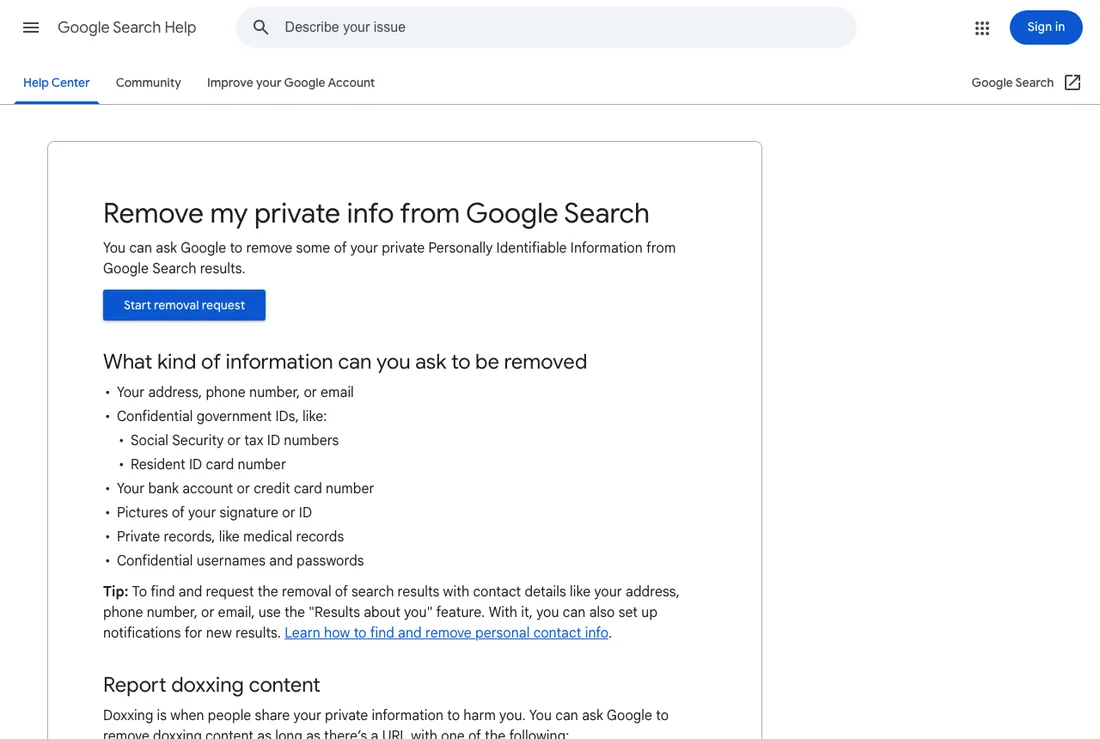
Google's published policy on what personal information it will remove from Search results. It defines the categories that qualify, which is why reading it first saves submitting requests that were never going to be granted. Screenshot taken 19 August 2026.
Step five: reduce what you give away from here on
Everything above is cleanup. This step is about the size of next year's footprint.
- Use a password manager and unique passwords, and turn on multi-factor authentication.
- Use email aliases or a forwarding address for signups that do not need your real one.
- Decline app permissions that are not necessary for the app to work, especially location and contacts.
- Use a browser with tracking protection, and keep extensions minimal, since each one adds to a recognisable fingerprint.
- Clear cookies periodically, or use a container or private window for casual browsing.
- Give a real phone number only where it is genuinely required.
What each step actually buys you
| Step | Effort | Visible effect | How durable |
|---|---|---|---|
| Close dormant accounts | Medium | High | Permanent |
| Delete old posts | High | High | Original gone, copies remain |
| Tighten privacy settings | Low | Medium | Until the platform changes defaults |
| Broker opt-outs | High | Medium | Months, then re-check |
| Browser and device hardening | Low | Low now, high later | Ongoing |
What you cannot remove, said plainly
Public records stay public: property deeds, court dockets, professional licences, business filings. Published journalism is not removable on request, and syndicated copies multiply the addresses it lives at. Data already exposed in a breach cannot be recalled. Archived snapshots of deleted pages persist at the archive's address. And content other people published about you is theirs to remove, not yours.
If a business review is the problem, note that the route is policy rather than preference: Google's process for reporting an inappropriate review applies to reviews that violate its published rules, and a truthful negative review is not among them.
None of that makes the work pointless. It changes the target. A realistic outcome is a footprint where accurate, current, self-published material is what a stranger finds first, where nothing sensitive is sitting exposed in a broker database, and where the handful of permanent items are outnumbered rather than pretended away.
If you get through the first three steps and the picture still has not changed, that usually means the problem is one or two specific items rather than the footprint as a whole. Establishing which is what a reputation audit is for, and it is worth doing before spending another weekend on opt-out forms.
Questions about how to reduce your digital footprint
How do I reduce my digital footprint?
In order: close dormant accounts, delete old posts, tighten the privacy settings on accounts you keep, opt out of people-search sites and the data brokers behind them, then reduce what your browser and devices give away in future.
How do you remove your digital footprint?
You reduce it rather than remove it. Public records, published journalism, breach data, archived copies, and content other people published all persist after everything you control is gone.
How long does it take?
An afternoon covers accounts and posts for most people. Broker opt-outs take a few weeks to process and need re-checking two or three times a year, because records regenerate from the same public sources.
Are paid removal services worth it?
They do the same opt-out work on a subscription and face the same limits you do. What you are buying is time and consistency rather than any access an individual does not have.
Will reducing my footprint change my search results?
Sometimes. Removing people-search listings often clears several results for a full-name query. It has no effect on news coverage, public records, or pages published by other people.