
How do I check my digital footprint?
Checking your digital footprint means running five separate checks and writing down what each one returns: a name search done the way a stranger sees it, the major people-search sites queried directly, the data brokers behind them, a breach check on your email addresses and phone numbers, and an inventory of the accounts you still hold. No single digital footprint checker covers all five, because the data sits with parties that do not share it. The whole audit is free, takes an afternoon, and its real output is a written record you can compare against later.
Is there a free digital footprint checker?
Not one that does the whole job. Several tools are marketed that way, and most of them query a set of people-search sites and show you what they found. That is a real and useful slice. It is not your footprint, because it does not see your old accounts, your public posts, your breach exposure, or the results a search engine actually returns for your name.
The tool closest to an official checker is Google's own, and it is worth being precise about what it does.
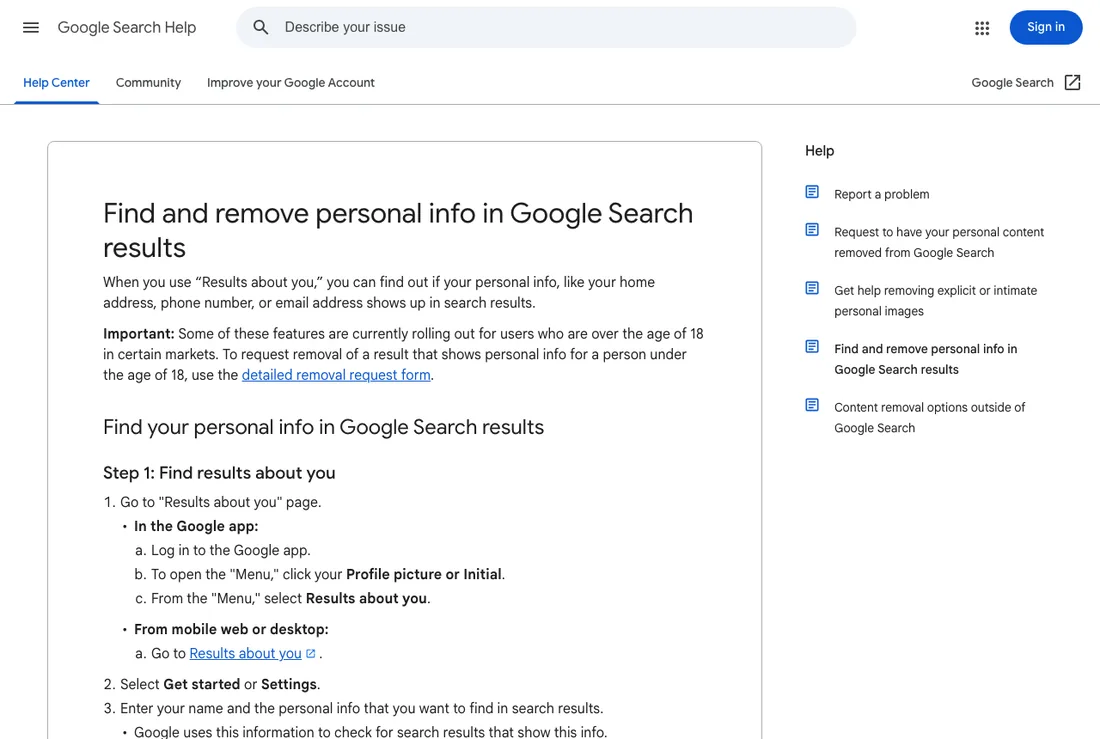
Google's Results About You finds search results that contain your phone number, home address, or email address and lets you request removal from Search. Its scope is contact details in results, not the pages themselves and not the broker records behind them. Screenshot taken 19 August 2026.
So the working answer is: assemble the check yourself from free sources. Below is the order that wastes the least time.
Start with the search results, seen the way a stranger sees them
Search your own name first, because it is the highest-signal check and it is free. The one thing that matters here is that a signed-in, personalised search on your usual device shows you a version of the results nobody else gets. Run it signed out and unpersonalised instead, cover the name variants people actually type, and check the images and news tabs rather than only the main list. The companion page on searching your own name properly sets out the method in detail; this page is about what to do with the findings.
Record the first two pages of results. Nearly all attention lands there, and a change on page one is the change that matters.
People-search sites, queried one at a time
People-search sites are the consumer-facing shopfronts of the data trade. They publish name, approximate age, current and previous addresses, relatives, and sometimes phone numbers, and they rank well for full-name queries because there is little competition for most names.
Check the large ones directly rather than through an aggregator, because aggregators miss the smaller regional sites that often carry the most detail. Search your full name plus your city, then your full name plus a former city. Note each site that has a listing and the exact URL of that listing, since you will need it for an opt-out.
The data brokers behind them
Behind the shopfronts sit the brokers that assemble and license the underlying records. Opting out of a people-search site does not remove you from the broker feeding it, which is why listings come back. The Privacy Rights Clearinghouse data broker directory is the most usable public index of who these companies are and where their opt-out pages live. Several states now maintain their own registries, which are useful for spotting brokers you would never have found by name.
Working through a directory is tedious and it is also the only method available. Set a limit for one sitting, record which ones you submitted, and treat the rest as a second session.
Breach exposure for your emails and phone numbers
Check each email address you use, including the old ones, against a breach-exposure service. This tells you whether credentials tied to that address have appeared in a known breach. It does not tell you that anything has been done with them, and a hit is not evidence of a problem in your search results. It is a security finding, and the right response is changing reused passwords and turning on multi-factor authentication, not reputation work.
The accounts you still hold, and the ones you forgot
Search your email archive for the words "welcome", "verify your email", and "confirm your account". This surfaces services you signed up for and forgot, which is where most orphaned public profiles live. For each account still live, decide whether to keep, tighten, or close it, and use the platform's download-your-data export before closing anything you might want a copy of.
Background screening files are a separate check
The file a background screening company holds on you is not in search results and will not appear in any footprint checker. If an employer, landlord, or lender ran a report, you have rights to see and dispute it, and the Consumer Financial Protection Bureau's guidance on credit reports and background screening explains how to request a copy and how to correct an error. Keep this separate from your online footprint in your notes: it is a different system with different rules.
What to write down
The audit is only worth doing if the result is a record. A simple table is enough.
| Column | What goes in it |
|---|---|
| Where | Site name and exact URL |
| What it shows | Name, address, photo, post, listing |
| Accurate | Yes, partly, no |
| Category | Active or passive |
| Route | Delete, opt out, correct, or nothing |
| Date checked | So you can see drift later |
Two notes on interpretation. First, accuracy matters more than volume: an incorrect address on a people-search site is a different problem from a correct one. Second, some findings have no route at all, and marking them as such is a legitimate outcome rather than a failure of the audit.
If a search result belongs to a page you do not control and the content is not going to be taken down at the source, Google Search Central's documentation on removing information from Search sets out which requests Google will and will not act on, in Google's own words. Reading it before submitting anything saves a lot of wasted effort.
Once the table exists, the question stops being what is out there and becomes which two or three entries are actually shaping what people conclude about you. That prioritisation is the substance of a reputation audit, and it is the point at which most people find the work becomes manageable.
Questions about how to check your digital footprint
How do I check my digital footprint?
Run five checks and record each: a signed-out search of your name, the major people-search sites queried directly, the data brokers behind them, a breach check on your email addresses, and an inventory of accounts you still hold.
Is there a free digital footprint checker?
No single tool covers the whole footprint. Google's Results About You is the closest official option and it is limited to contact details appearing in search results. The rest has to be assembled from free sources yourself.
How often should I check?
Twice a year is a reasonable baseline for most people, and quarterly if you have opted out of data brokers, because broker listings tend to reappear as records are refreshed from public sources.
Does checking my footprint change my search results?
No. Searching for yourself does not affect what others see. Personalisation only changes what you see, which is why the search is worth running signed out.